Four Devices, One Remote, No WiFi Required: WF04 + V15
Imagine using a single compact remote to switch on your garage lights, illuminate your workbench, activate a ventilation fan and turn off your storage-area lighting. Each function independently – without reaching for your phone, opening an app or connecting to a WiFi network.
That is what you can achieve by combining the WF04 four-channel smart relay module with the V15 universal RF remote control.
The WF04 provides four separate relay outputs, while the V15 offers four programmable buttons. Once the appropriate radio codes have been configured, each button can independently control its assigned channel.
Using the V15 does not require WiFi, an internet connection or a smartphone. The V15 transmits a 433 MHz radio signal, which the WF04 receives to switch the selected relay output.
This makes the combination particularly useful in garages, workshops, holiday homes, storage areas and other spaces where you want quick and convenient remote control.
1. How do the WF04 and V15 work together?
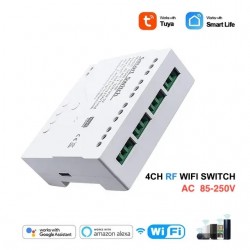
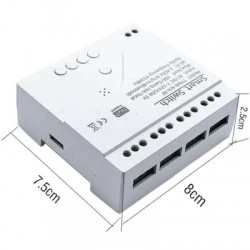
The WF04 is a control module with four independent relays. Each relay can operate a separately connected electrical device or circuit that has been correctly installed for the application.
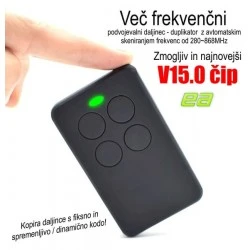
The V15 is a compact four-channel RF remote that stores different radio codes. For WF04 control, the system uses suitable codes in the 433 MHz band.
In toggle-control mode, pressing a button changes the state of its assigned channel: ON or OFF. The other three channels remain in their current states.
| V15 button | WF04 output | Function |
|---|---|---|
| A | Channel CH1 | Independent ON/OFF control of device 1 |
| B | Channel CH2 | Independent ON/OFF control of device 2 |
| C | Channel CH3 | Independent ON/OFF control of device 3 |
| D | Channel CH4 | Independent ON/OFF control of device 4 |
For example, press A to illuminate your workbench and B to switch on the shelf lights. If you later switch off the workbench lighting, the shelf lights stay on. Only the selected channel changes state.
The WF04 must have electrical power, but the control command itself only requires a working local RF connection within remote range.
2. Why is RF control so convenient?
No Internet Needed
Control operates locally. A button press does not require a connection to your router or an internet service.
No Phone Needed
When entering your workshop or arriving at your holiday home, simply press the relevant button on the remote.
Four Independent Channels
One remote controls four different functions. You can use only the devices you currently need.
Optional WiFi Functions
The WF04 also supports Tuya Smart and Smart Life, enabling future smartphone control and smart-home scenes.
For everyday operation, another benefit is simplicity. Family members or colleagues can operate the assigned devices without having to use a mobile app.
3. Real-Life Example 1: Workshop or Garage
Your garage has several areas: a parking space, a workbench, tool shelves and ventilation. Most of the time you need only one or two functions, rather than everything at once.
Use the WF04 as the central relay-control module and assign the V15 buttons to four functions:
| Button | What does it control? | When to use it |
|---|---|---|
| A / CH1 | Main garage lighting | When entering the garage. |
| B / CH2 | LED workbench lighting | During repairs and precision work. |
| C / CH3 | Tool-shelf or storage-area lighting | When looking for tools or spare parts. |
| D / CH4 | Ventilation fan | When additional airflow is needed. |
How does it work in practice?
You enter the garage and press A on the V15. The main lights turn on. You plan to work at the bench, so you press B as well. When you need ventilation, press D to activate the fan.
When you finish, switch off only the functions you used. Every button controls a separate channel, so there is no need to walk around looking for individual wall switches.
Benefit: one remote for lighting and auxiliary devices. This arrangement is particularly attractive in basement workshops or garages where the WiFi signal is weak or unavailable.
4. Real-Life Example 2: Holiday Home Without Internet
A small holiday home or cabin may not have a permanent internet connection. Even so, convenient remote lighting control is useful, particularly when arriving after dark.
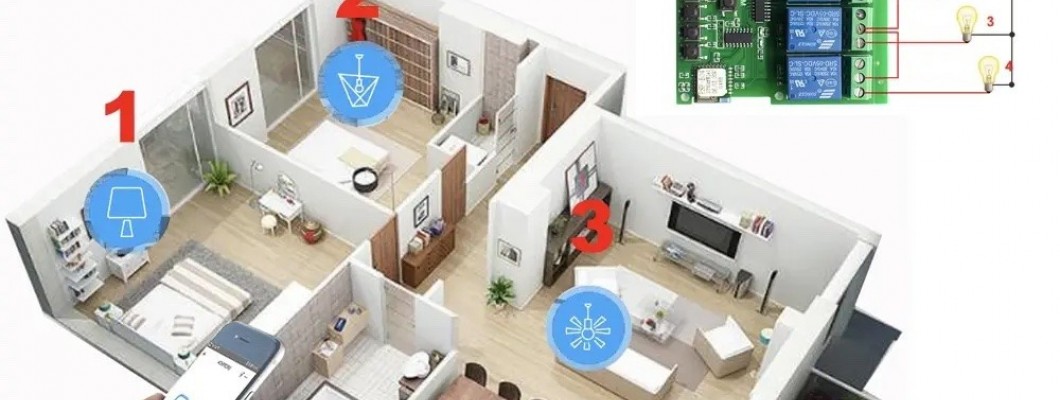
The WF04 and V15 can form a standalone local system for four selected lighting circuits.
| Button | Function | Everyday use |
|---|---|---|
| A / CH1 | Entrance light | Light the entrance when arriving. |
| B / CH2 | Main living-room light | Illuminate the interior. |
| C / CH3 | Terrace lighting | Enjoy evenings outdoors or welcome guests. |
| D / CH4 | Shed or utility-room light | When collecting tools or supplies. |
Arriving at your cabin in the evening
You arrive at your holiday home and use the remote to turn on the entrance light, followed by the living-room lighting. Later, when you step onto the terrace, press the third button to switch on the outdoor lights.
Everything works over a local radio connection – without WiFi, a router or a smartphone.
You do not need to install an internet connection just to operate four separate lighting circuits from a convenient handheld remote.
RF range depends on distance, walls and other obstacles. Test the module's position and the actual radio range at your location.
5. Real-Life Example 3: Shop, Salon or Showroom
Preparing a shop or salon for a working day often involves several lighting groups. The window display, presentation shelves, main floor and decorative lighting do not always need to operate at the same time.
With the WF04 and V15, you can control four lighting zones separately, without opening an app or searching for individual switches.
| Button | Zone | Purpose |
|---|---|---|
| A / CH1 | Shop-front sign | Visibility of the business. |
| B / CH2 | Display-shelf lighting | Highlight featured products. |
| C / CH3 | Main room lighting | Everyday work and welcoming customers. |
| D / CH4 | Decorative LED lighting | Evening ambience and presentations. |
Example: Opening the shop
When you arrive, switch on the main lights and display-shelf lighting. Turn on the shop sign while preparing the window display. In the evening, you can switch off the main room lighting while leaving the decorative or display lighting on.
The advantage of four independent channels is straightforward: use only the lighting you currently need. It is a practical approach for shops, reception areas, showrooms and smaller salons.
6. How do you prepare the WF04 and V15?
RF control requires an initial configuration of the radio codes and the connection between the V15 and the WF04 receiver. After this setup, everyday operation takes place directly over the local radio signal.
- Install the WF04. Provide the correct supply to the module and connect its four relay outputs to the selected devices or appropriate control circuits.
- Prepare the V15. The four buttons must store appropriate 433 MHz RF codes. As a duplicator, the V15 can copy codes from a compatible RF transmitter.
- Assign buttons to channels. Using the WF04's RF learning function, assign A to channel 1, B to channel 2, C to channel 3 and D to channel 4. Follow the instructions for your particular module version.
- Test each channel. Use the remote to switch every output on and off independently and confirm that the other channels retain their states.
- Verify operation without WiFi. During testing, disconnect the WiFi connection, not the WF04 power supply. The V15 should continue to operate the correctly configured RF channels.
The V15 is powered by a CR2032 battery, so everyday RF operation does not require a charging cable or network connection.
Useful tip: if you already use the V15 to duplicate other remote controls, plan the button assignments before programming. Dedicate all four buttons to the WF04 when you want independent access to its four channels.
7. What if you want smartphone control later?
This is where the WF04 offers additional versatility. It supports both a local RF signal and a 2.4 GHz WiFi connection.
When connected to Tuya Smart or Smart Life, you can also use supported functions such as:
- switching channels on and off from a smartphone,
- setting operating schedules,
- creating smart-home scenes,
- monitoring temperature with the included probe,
- controlling devices based on configured temperature conditions.
The V15 remains a convenient local control option, while the app adds functions you can use through a network connection.
| Function | V15 · RF | Phone · WiFi |
|---|---|---|
| Control four channels | Yes, locally | Yes, through the app |
| Internet needed for each command | No | Remote functions require a suitable network connection |
| Schedules | Button-based control | Supported in the app |
| Temperature-based scenes | Button-based control | Supported in the app |
8. Frequently Asked Questions
Can I control the WF04 using the V15 without WiFi?
Yes. Once the RF codes have been configured, commands are transmitted locally over the 433 MHz radio connection.
Can I switch only the second channel?
Yes. Each channel is independent. Assign button B to CH2 and you can control it without changing the other three channels.
Do I need a phone for everyday use?
No. A configured V15 is sufficient for local RF control. Smartphone control is an additional option when using WiFi features.
Can one V15 operate all four WF04 relays?
Yes. Assign each of the four buttons to its corresponding WF04 channel.
Does the WF04 still require power?
Yes. RF control removes the need for WiFi to transmit the command; it does not replace the module's electrical supply.
Can the WF04 also control a fan or other appliances?
Yes, provided the devices are correctly connected and suitable for the selected relay outputs. Alongside lighting, auxiliary functions in workshops and technical rooms are practical applications.
9. What should you consider during installation?
The WF04 has four relay outputs with a published rating of 10 A per output. The type of electrical load, such as an LED power supply or fan motor, also matters when selecting components.
Have a qualified installer handle mains-voltage connections and suitable circuit protection. Use appropriate weather protection for outdoor lights and equipment. Install the WF04 in a suitable enclosure according to the supplied version's instructions.
For everyday lighting zones and suitable auxiliary devices, the WF04 + V15 combination offers practical, independent control without requiring an app.
Four Functions Controlled by One Remote
Want to operate garage lighting, workbench lights, holiday-home circuits or shop displays separately? The WF04 four-channel relay module and V15 RF remote offer a convenient solution that does not require WiFi for local commands.
Choose the WF04 for its four independent outputs and the V15 for four-button operation. If you wish, you can add Tuya Smart Life smartphone control later.
Conclusion: Smart Control Can Work Without the Internet
The WF04 and V15 make a useful combination for anyone who wants to operate four devices independently, quickly and without a phone.
In a garage, that means four functions on one remote. At a holiday home, convenient control without WiFi. In a shop, the freedom to adapt lighting to how the space is being used.
Four buttons, four channels and the freedom to switch exactly what you need. That is the practical appeal of combining the WF04 with the V15.