Will the V15 remote work with your garage door?
One remote for the garage, driveway gate and parking barrier is convenient. But before buying a V15 universal remote, the question that matters more than the door brand is: which radio system does your existing remote use?
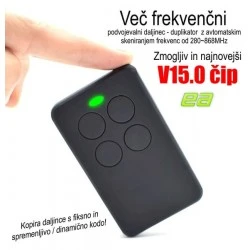
The V15 has four buttons, a stated frequency range of 280–868 MHz and a CR2032 battery. These are product specifications, not a guarantee that it will work with every receiver operating in this range.
Below, you will learn how to check compatibility, understand the differences between fixed and rolling codes, and approach programming correctly.
1. Check these four details first
- Exact original remote model: read the model number on the back or inside the battery compartment. A brand name alone is not enough.
- Frequency: look for a marking such as 433.92 MHz or 868 MHz. A matching or similar frequency is important, but does not guarantee compatibility.
- Coding system: fixed code, rolling code and proprietary protected protocols require different procedures.
- Receiver access: with many rolling-code systems, the authorised operator must additionally register the new remote with the garage door receiver.
Practical example: you have one remote for the garage and another for the driveway gate. If both systems are supported, you can assign them to different V15 buttons. However, if one gate uses an unsupported protocol, having four buttons will not overcome that incompatibility.
2. Fixed Code or Rolling Code – what is the difference?
Fixed-code remotes normally transmit the same code whenever their button is pressed. If the V15 supports the protocol, copying may be relatively straightforward.
Rolling-code systems change the transmitted code according to a defined algorithm. The receiver and remote must use compatible coding technology, and registering a new transmitter may require authorisation from the receiver.
Important: receiving and storing a radio signal on the V15 does not necessarily mean that the garage door receiver will accept the new remote.
Some systems use special seed codes, while others require registration directly through the operator's control unit. Certain protected protocols do not permit conventional duplication at all.
3. Hörmann, NICE, BFT, FAAC and SOMMER: compatibility
With popular European garage door and gate manufacturers, it is important to distinguish between different generations of radio technology.
| System | Practical assessment for V15 |
|---|---|
| Hörmann BiSecur (BS) | BiSecur is listed as incompatible. Do not purchase the V15 expecting to copy a remote transmitting in BiSecur mode. |
| Older Hörmann fixed-code systems | A possible candidate after checking the exact transmitter model and radio mode. Some remotes can operate in different modes, so their appearance alone is not sufficient. |
| NICE FLO / FLO-R | NICE FLO uses fixed-code technology, while FLO-R follows a different coding or registration procedure. Check the exact model and receiver instructions first. |
| BFT | Selected BFT families are listed as supported. Certain rolling-code systems require a seed code and additional receiver registration. |
| FAAC | Some older SLH versions require a suitable original MASTER transmitter. Newer generations are not necessarily compatible. |
| SOMMER TX55-868-4 | Listed as incompatible. A similar frequency does not mean that the radio protocols match. |
This table does not represent physical testing of every V15 and receiver combination. Its purpose is to help buyers check compatibility and avoid choosing the wrong product.
4. Special warning: Hörmann BiSecur
With Hörmann, the difference between older fixed-code systems and modern BiSecur is particularly important.
Older Hörmann remotes operating around 868 MHz may use a different radio protocol from newer BiSecur versions. Certain older models have distinctive blue physical buttons, but colour alone is not a reliable identification.
BiSecur uses a protected radio protocol. Model names such as HSE 2 BS, HSE 4 BS or HS 5 BS indicate this product family.
Recommendation: if you have Hörmann BiSecur, choose an original or explicitly verified compatible remote for that system. The V15 is not a suitable option for conventional copying of protected BiSecur codes.
Some original Hörmann remotes also support an older fixed-code operating mode. However, this does not mean that the V15 will work with a receiver that requires BiSecur.
5. How to prepare and program the V15
- Confirm authorisation. Program only your own system or one for which the operator has granted permission.
- Check both batteries. The V15 uses a CR2032 battery. A weak battery in the original remote can make signal transfer unreliable.
- Prepare the selected channel. Enter learning or copying mode according to the supplied V15 instructions. Different firmware versions may use different button combinations.
- Position the remotes a few centimetres apart. Follow the V15 learning procedure and observe the LED indicator.
- Store the signal on your chosen button. Assign the received signal to one of the four V15 buttons using the procedure specified for your particular remote version.
- Test the result. With a compatible fixed-code system, the copied remote may work immediately. Rolling-code systems may require additional receiver registration.
Important: do not press the LEARN or PROG button on the gate operator without reading its instructions. Some procedures may change or erase existing transmitter registrations. For a shared garage, registration should be performed by an authorised operator.
6. What if the V15 receives the code but the door will not open?
This is one of the most common situations when dealing with rolling-code remotes.
- Check the exact model numbers of the original remote and receiver again.
- If the system uses rolling code, check whether the receiver requires registration of a new transmitter.
- If the original remote only works close to the door, check its battery and possible radio interference.
- If the original uses an unsupported protected protocol, repeating the copying process will not resolve the incompatibility.
- Make sure the correct V15 button has been programmed and that the original remote still operates normally.
If the system requires official registration, contact the building manager or gate service provider.
7. Practical examples of using the V15
Example A: garage and driveway gate. If you use two compatible original remotes, you can assign the garage to button 1 and the driveway gate to button 2.
Example B: an extra remote for a family member. The V15 may provide an additional remote for supported systems. Complete any necessary receiver registration before use.
Example C: an older remote that is difficult to replace. For a supported fixed-code system, the V15 may be an alternative to the original transmitter.
Example D: a shared apartment garage. Even when the radio system is technically compatible, the building manager may restrict additional transmitters. You will need permission to register one.
8. Frequently asked questions
Can the V15 operate four different doors?
The V15 has four separate buttons. Each can be assigned to a different supported system. Compatibility must be checked for every system individually.
Does 868 MHz mean it will work with Hörmann?
No. Frequency alone does not identify whether the system uses fixed code, BiSecur or another protocol.
Is copying rolling code the same as programming the door?
Not necessarily. Even if the V15 receives a signal, the receiver may still need to recognise and authorise the new transmitter separately.
Must I erase memory before every copying attempt?
Do not assume so. Follow the instructions supplied with your particular V15 version to avoid losing previously programmed buttons.
Can the V15 copy every 433.92 MHz remote?
No. The radio encoding and protocol must also be supported.
Do I need the original remote?
The described copying procedure requires a working, compatible original remote. Without one, ask the building manager or gate service provider about officially registering a suitable new transmitter.
9. Safety and responsible use
- Only duplicate remotes for systems you are authorised to operate.
- Keep people and objects clear of moving doors during testing.
- Do not alter the operator's safety settings.
- Keep the CR2032 coin-cell battery away from children.
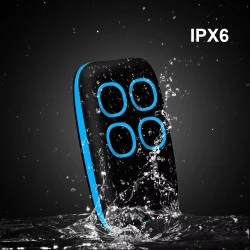
- Do not expose the device to water or excessive heat unless its protection is explicitly confirmed.
Check your remote before ordering
Send EA ELEKTRONIKA a photo of the front and back of your original remote, together with the model number of the gate operator or receiver. This makes it possible to assess a specific installation more reliably than using the door brand alone. Do not send access codes or other confidential information.
Conclusion
The V15 is a practical choice when you want to combine several confirmed compatible remotes into one device.
First identify the model, frequency and radio protocol. Then check whether receiver registration is required. This approach is more reliable than assuming a door will work simply because its brand appears on a general compatibility list.