WF04 in Practice: 8 Smart Ideas for Your Home, Garden and Workshop
Imagine controlling terrace lighting, a fan in your equipment cabinet, plant irrigation or several devices at a holiday property with one compact controller. Some devices could follow schedules, others could be controlled from your smartphone, and selected equipment might respond to temperature when the relevant automation functions are available.
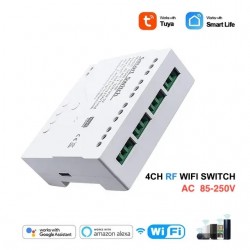
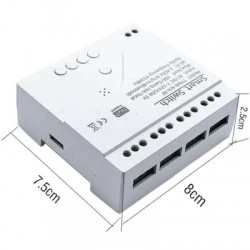
These are the kinds of projects for which the WF04 four-channel smart WiFi switch with temperature probe can be useful. It offers four separate relay outputs, 2.4 GHz WiFi, Tuya Smart and Smart Life compatibility, and scheduled control.
This guide explores eight practical applications with functional diagrams. Each explains the purpose, possible channel assignments and the precautions to consider before installation.
First, what can the WF04 actually do?
| Feature | Specification |
|---|---|
| Relay outputs | 4 separately controlled channels |
| Control options | Tuya Smart / Smart Life, schedules, supported 433 MHz RF control |
| WiFi | 2.4 GHz, IEEE 802.11 b/g/n |
| Power input | According to EA: AC 85–250 V or USB 5 V; check the actual unit before selecting and connecting power |
| Temperature probe | One waterproof probe, stated range −20 to +80 °C |
| Declared output rating | Up to 10 A per channel, subject to load type, inrush current and any combined limits |
Important: the WF04 has one temperature probe and four outputs. It is not a four-zone thermostat with four independent temperature sensors. It is also not an electricity meter, humidity sensor or safety controller.
A Smart Shelf for Seedlings and Microgreens
Seedlings benefit from regular light cycles, suitable air circulation and awareness of their growing temperature. Instead of several independent timers, you can organise the auxiliary equipment on one shelf with the WF04.
Example: CH1 controls a grow light from 7:00 AM to 8:00 PM. CH2 runs a small circulation fan on a schedule. CH3 could operate an additional fan when the temperature gets too high, provided your particular WF04 and app expose the probe as a usable automation condition. CH4 remains available for an extra light.
The benefit is not that the WF04 will grow plants for you. It helps organise daily tasks. Watering, soil moisture and the suitability of the actual growing temperature still need independent attention.
Ventilation for a Router, NAS or Electronics Cabinet
Routers, network switches and compact NAS servers can generate considerable heat in closed cabinets. One possible project is supplementary ventilation, with the probe placed near the warmer upper part of the enclosure.
If the installed firmware exposes suitable temperature automation, you might use an illustrative rule such as switching an auxiliary fan on above 30 °C and off below 27 °C. These are example thresholds only; actual settings must match the equipment and available app functions.
Critical servers require independent cooling and monitoring. A cloud-connected Tuya automation should not be the only means of preventing overheating.
Two Irrigation Zones for Raised Beds or Balcony Plants
Potted plants and raised beds often need different watering schedules. The WF04 can be used to coordinate two separate irrigation zones with suitable valves and a correctly engineered water supply.
Example: CH1 operates one solenoid valve at 6:30 AM for a planned duration. CH2 controls another zone with a different schedule. CH3 can be assigned to decorative garden lights, while CH4 remains available.
Use appropriate normally closed valves, independent protection against flooding and a manual water shut-off. The WF04 does not measure soil moisture, detect leaks or monitor water flow without additional equipment.
Four Lighting Zones for a Shop Window or Exhibition
A retail space may have a lit sign, a product display, a feature shelf and decorative lighting. Instead of one switch for everything, the WF04 can help organise four separately scheduled lighting circuits.
For example, the sign could operate from 8:00 AM to 8:00 PM, the window lighting from 4:00 PM to 10:00 PM, decorations in the evening, and the indoor display during opening hours. Adjust these illustrative schedules to the actual location.
LED power supplies can draw substantial inrush current despite their modest normal consumption. Larger lighting groups may require a properly rated contactor or dedicated interface selected by a qualified electrician.
A Smarter Workshop: Task Lighting, Auxiliary Fans and Indicators
Small electronics and repair workshops often have several auxiliary devices that do not need to run together. The WF04 can organise lighting, ordinary ventilation and status indicators.
For example, CH1 operates workbench lights, CH2 a supplementary fan, CH3 a status LED, and CH4 tool-cabinet lighting. Dangerous machinery, essential fume extraction and equipment with safety-critical functions must not rely on the WF04 app for safe operation.
A useful option is a “Finish Work” manual scene, where supported: one tap turns off several auxiliary channels. This is not a replacement for physically disconnecting equipment from its supply when required.
Holiday Cottage: Lights and Auxiliary Ventilation Before Arrival
If you use a weekend property, you may appreciate switching on an entrance light or supplementary ventilation before you arrive. The WF04 offers remote app commands as long as the device and its internet connection remain available.
The WF04 is not a security alarm, pipe-freeze protection system or certified thermostat. Remote heating applications must retain independent protections against overheating, fire and freezing.
A Decorative Garden Pond: Separate Fountain and Lighting Control
At a small ornamental pond, the WF04 could separate a decorative fountain schedule from evening lighting. The fountain can run at selected times, while the lights operate only after dark.
The pump must have suitable dry-running protection and electrical protection appropriate for a wet environment. Keep the WF04 out of water and rain. Do not use it as the sole controller of a pump essential to fish survival.
Seasonal Lighting: Four Zones Without Four Separate Timers
Holiday lights, balcony decorations, an entrance wreath and garden lighting can all need different schedules. Four WF04 channels offer a more organised approach than multiple unrelated timers.
Only use power supplies and lights suitably rated for their location. Outdoor circuits need appropriate environmental protection, and the WF04 itself should be located in a suitable enclosure or dry indoor location.
How to Set Up Tuya Smart or Smart Life
- Safe installation: choose the correct power source, protective enclosure and suitable load connections. A qualified person should handle any mains wiring.
- Network: prepare a 2.4 GHz WiFi connection. The WF04 cannot be paired directly to a 5-GHz-only network.
- App: install Tuya Smart or Smart Life, then add the device using the method supported by your supplied WF04 version.
- Channels: test CH1, CH2, CH3 and CH4 individually using safe test loads, and assign clear names.
- Schedules: set scheduled ON/OFF commands, for example for lighting.
- Temperature scenes: check whether the measured temperature is actually available as an automation condition and whether that condition can control the chosen relay. The available options depend on the device firmware and app.
- Failure testing: check what happens after a power failure, WiFi outage and internet outage. Equipment with safety-critical requirements needs independent protection.
Temperature control: having different switching-on and switching-off thresholds can prevent a fan from rapidly cycling. This is called hysteresis. Do not assume the WF04 offers configurable hysteresis or fully local temperature regulation until you have confirmed these functions in the app and tested them.
What Must Be Checked Before Actual Wiring?
The diagrams above represent functional relationships: which command controls which device. They are not terminal-level wiring instructions showing live, neutral or protective-earth conductors.
- The precise terminal markings on the WF04 version being supplied.
- Whether the relay contacts are voltage-free and how the output circuits are electrically arranged.
- Load compatibility, including the type of equipment, continuous current and starting current.
- The maximum combined load across all channels and necessary protective devices.
- Controller power supply, electrical isolation, enclosures and protection against accidental contact.
- Output behaviour after power restoration and connection failure.
A 10 A relay rating does not automatically permit direct connection of motors, high-power heaters or four simultaneously fully loaded channels. Inductive and demanding loads may require properly rated control interfaces or contactors.
Frequently Asked Questions
Can the WF04 control four devices independently?
Yes. The WF04 has four separate relay outputs. Whether a particular device can be connected depends on its electrical requirements.
Can the WF04 measure four room temperatures?
No. EA describes one temperature probe. Having four outputs does not provide four independent temperature readings.
Will it work without the internet?
Do not assume the same functionality. Remote access and Tuya automations may depend on connectivity. Test local control and scheduled operations under connection loss before relying on them.
Can the WF04 measure electricity consumption?
Energy monitoring is not listed as a WF04 feature. For this purpose, consider a suitably rated energy-monitoring smart plug such as EA E0809.
Can it automatically open garage doors?
That requires verifying the opener's control input, pulse requirements and safety functions. The WF04 has no confirmed door-position feedback. A dedicated garage module with position sensing, such as EA E0807, is generally a more suitable starting point.
Are all WF04 temperature automation functions identical?
Not necessarily. Several devices on the market use similar model names but different apps and features. Confirm the options on your particular unit before using the temperature reading to control connected equipment.
One Controller, Four Channels and Many Possibilities
The WF04 is an interesting option if you want to combine scheduled operation, smartphone commands and several separately controlled relay outputs in one place. Start by identifying your loads, required switching functions and safety requirements.
Explore the WF04 at EA Elektronika and plan your next smart-home project.
Conclusion
The WF04 is more than a smart light switch. Four independently controlled channels can help organise lighting, auxiliary ventilation, irrigation and many other non-critical tasks. Successful projects depend on choosing the right application, ensuring safe electrical installation and checking the actual app capabilities.
Begin with a simple project such as four scheduled lighting circuits. Once that works reliably, you can explore more advanced scenes and temperature sensing. Never use an unprotected WiFi controller as the only safety measure for heating, water systems or critical equipment.